

Running Pace Percentage Calculator
The running pace percentage calculator finds a workout pace, a reference pace or the percentage between two paces. Choose the percentage convention used by your plan before calculating. A percentage of speed and the Canova-style pace convention don’t produce the same number, especially as you move farther from 100%.
Your Workout Pace
min / mile
What Changes?
The percentage describes a mathematical relationship between paces, not your heart rate, effort level or a prediction of race fitness.
Same Percentage, Different Meaning
| Method | Workout Pace / Mile | Workout Pace / km |
|---|
Use the convention your coach or plan specifies. The highlighted row is your selected method.
Your Workout Split Times
Each value is one continuous segment at the calculated workout pace. No recovery is included.
Compare Nearby Percentages
| Percentage | Pace / Mile | Pace / km | 400 m Split | Use |
|---|
How the running pace percentage calculator works
You can use the running pace percentage calculator to find a workout pace from a reference, reverse that calculation to recover the reference, or compare two known paces under a chosen convention. The starting point is to express both paces as time per the same distance, which keeps a mile-based reference comparable with a track split. This tool accepts mile, kilometer, 400-meter and 200-meter units and converts them into seconds per meter internally. That gives the percentage calculation one consistent basis even when the units in your plan look quite different.
For instance, 4:00/km equals 96 seconds per 400 meters. Those are the same speed, so their relationship is 100% under either convention. Comparing the bare numbers four and 96 would miss both the time conversion and the distance conversion.
After calculating, read the reported change in speed and change in time per distance. They describe two related quantities, which move in opposite directions as you run faster.
The calculator follows the convention you select. It doesn’t infer what a coach meant by an unlabeled percentage, and the term ‘pace percentage’ by itself isn’t enough to settle that question. Check the notation in your plan before choosing a method.
Pace percentage and speed percentage give different results
In the Canova-style option implemented here, 110% means reducing the reference time per distance by 10%. In the speed option, 110% means increasing speed by 10%. Both produce a faster pace, but their clock times differ.
Canova-style workout time = reference time × (2 − percentage ÷ 100)
Speed-based workout time = reference time × 100 ÷ percentage
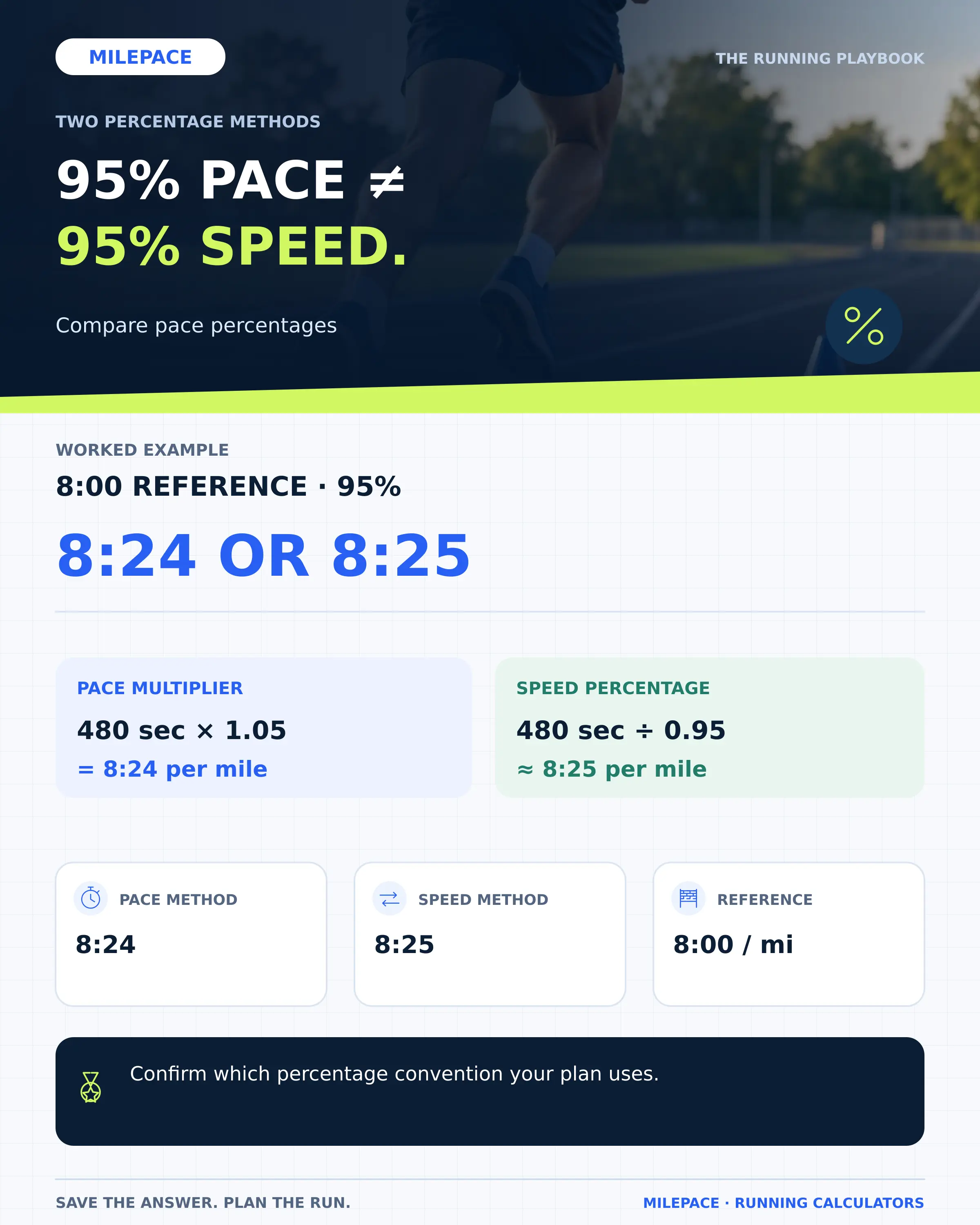
With a reference of 5:00/km, the first method gives 4:30/km at 110%. The speed method gives about 4:33/km. Multiplying 5:00 directly by 1.10 would instead give 5:30/km, which is a 10% increase in time and therefore a slower pace.
That third interpretation is why the convention matters. A training plan may define its notation explicitly, and that definition should guide which calculation you use.
The Canova-style factor must stay positive, so this tool requires a percentage below 200%. At 200%, its formula would give zero time per distance. The speed option has a separate product limit of 1,000%. These boundaries prevent unsupported calculations; they aren’t recommended training intensities.
Find workout pace, reference pace or percentage
You can choose Workout pace when your plan supplies a reference and percentage, then let the selected factor convert that reference into time per mile, kilometer or track distance. Reference pace mode works backward when you know the workout pace and its prescribed percentage. It divides workout time by the same factor, so a 4:30/km workout at 110% under this Canova-style convention gives a 5:00/km reference. Keeping the convention fixed through both steps lets you check the calculation instead of accidentally reversing it under a different definition of percentage.
Choose Percentage when you know both paces. The calculator compares them in consistent units, then expresses that relationship under your selected convention. A change of method can change the percentage even though neither pace has changed.
For example, 4:30/km compared with 5:00/km is 110% under the Canova-style calculation, but about 111.11% of speed. That comes from 300 seconds divided by 270 seconds, multiplied by 100.
You can check the result by switching back to Workout pace and entering the derived percentage with the original reference. Use the unrounded percentage where possible, because a rounded input can produce a small difference when you reverse the calculation.
Worked percentage examples
At 100%, both methods return the original reference pace. Below 100%, they produce slower running; above 100%, they produce faster running. The size of the difference depends on the percentage.
| Percentage | Canova-style pace | Speed-based pace |
|---|---|---|
| 90% | 5:30/km | 5:33/km |
| 95% | 5:15/km | 5:16/km |
| 100% | 5:00/km | 5:00/km |
| 105% | 4:45/km | 4:46/km |
| 110% | 4:30/km | 4:33/km |
The displayed values are rounded to whole seconds. At 110% of speed, the unrounded time is about 272.73 seconds per kilometer. Keeping that value gives a 400-meter split of about 1:49.1, while the Canova-style result gives 1:48.
The reference itself matters as much as the percentage. A percentage attached to marathon pace is based on a different starting value from the same percentage attached to threshold pace. Keep the reference label beside your result when transferring it to a workout note.
Use a percentage from your training plan
Start with the reference and convention your plan specifies; if you need a race-derived reference first, the Training Pace Calculator provides separate category estimates from a recent result. After applying the percentage, you can translate the workout pace into the distances given in your session. For instance, a 200-meter split takes half the uninterrupted running time of a 400-meter split at the same pace. Recovery and repetition count remain separate parts of the workout, so you’ll still need those details from your plan when putting the calculated split into use.
The Track Pace Calculator can turn a known pace into cumulative checkpoints. If you simply need min/mile, min/km or mph at the same speed, the Pace Converter handles that without changing intensity.
You should also keep the calculation’s limits in view. A percentage relationship doesn’t measure your threshold, predict adaptation or decide how many repetitions are suitable. It converts the values you’ve entered. An unusually fast result is a reason to check the reference and convention before treating it as part of a session.
Frequently Asked Questions
Does 90% mean 10% slower?
Under the Canova-style option here, it adds 10% to time per distance. At 90% of speed, time per distance increases by about 11.11%. Specify the convention when using the phrase ‘slower’.
Can I compare a 400-meter split with mile pace?
Yes. Select the correct unit for each input. The tool converts them to time per meter before finding their relationship.
Is 105% a heart-rate target?
No. This calculator compares running pace or speed. It doesn’t calculate a heart-rate zone or a percentage of measured oxygen uptake.
Why does reversing a rounded result change a second?
Rounding removes part of the original value. If you use the rounded pace or percentage as a new input, the reverse calculation may not reproduce every original decimal.